 admin@graminguru.in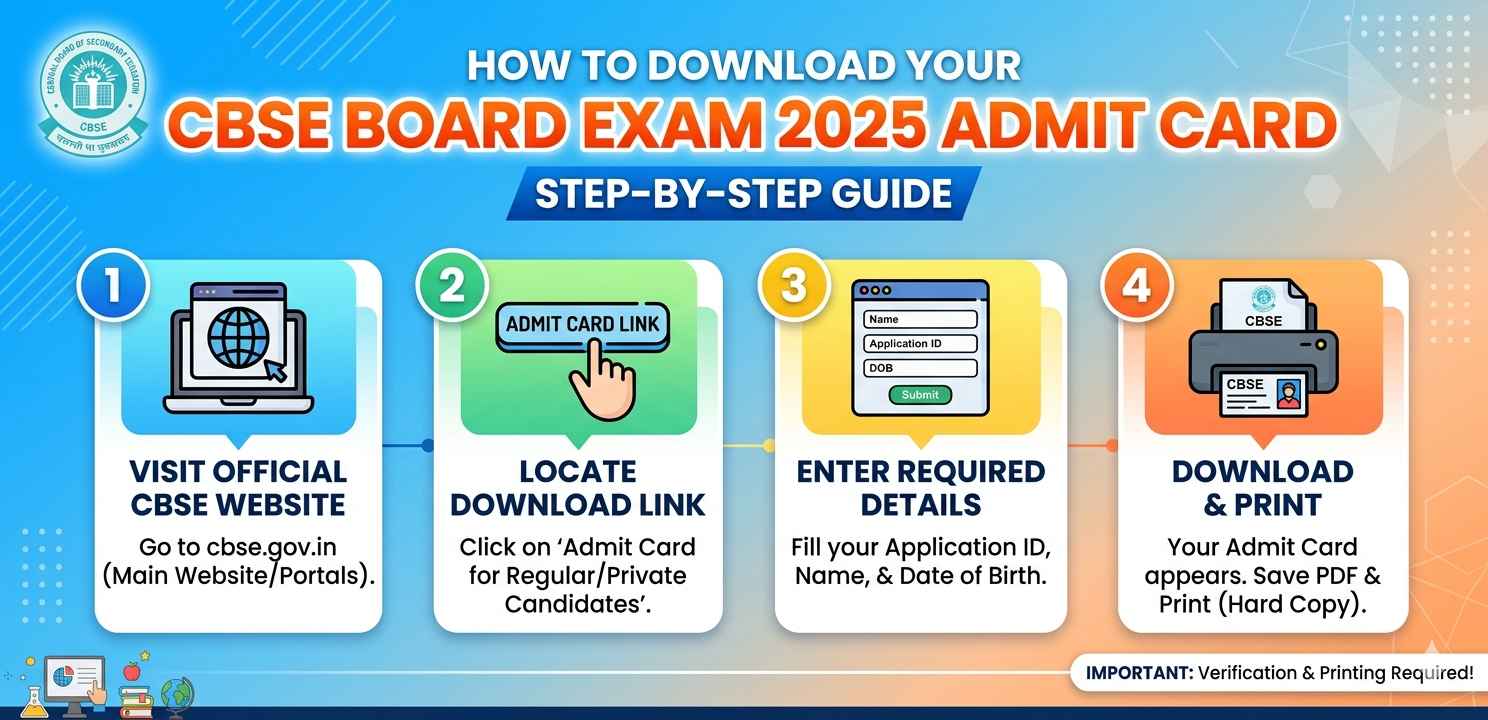
Introduction
Every year, millions of students across India sit for the CBSE board exams, and without an admit card, you simply cannot enter the examination hall. If you’re a Class 10 or Class 12 student wondering how to get your CBSE Board Exam 2025 Admit Card, you’ve come to the right place.
The CBSE Board Exam 2025 Admit Card is not just a piece of paper — it’s your official permission slip to appear in the exam. It carries your roll number, exam center details, subject schedule, and your photograph. Missing or losing it before the exam can cause a lot of unnecessary stress.
This guide will walk you through everything step by step — from where to find it, how to download it, what to verify, and what to do if something goes wrong.
What Is the CBSE Board Exam 2025 Admit Card?
The CBSE Board Exam 2025 Admit Card is an official document issued by the Central Board of Secondary Education (CBSE). It is released a few weeks before the board exams begin and is made available through schools as well as through the CBSE official portal.
It contains:
- Student’s full name and roll number
- Date of birth
- Exam center name and address
- Subject-wise exam schedule
- Passport-size photograph
- Signature of the student
Without a valid CBSE Board Exam 2025 Admit Card, no student is allowed to sit in the examination hall. So downloading and printing it on time is really important.
Who Can Download the CBSE Board Exam 2025 Admit Card?
Both Class 10 and Class 12 students registered under CBSE for the 2024–25 academic session are eligible to download the CBSE Board Exam 2025 Admit Card.
Generally, the admit card is first released to schools, and school authorities then distribute it to students. However, in many cases, students can also access it online using their credentials through the DigiLocker platform or the CBSE official website.
If your school hasn’t given it to you yet and the exams are near, don’t panic. There are online methods too, which we’ll cover below.
Official Websites to Download the CBSE Board Exam 2025 Admit Card
Before we go into steps, make sure you’re using only these official sources:
- cbse.gov.in — Official CBSE website
- DigiLocker (digilocker.gov.in) — Government’s digital document platform
- UMANG App — Another government-approved platform
Avoid any third-party websites that claim to offer admit cards. They may ask for personal details and are often unreliable or even unsafe.
Step-by-Step Guide to Download CBSE Board Exam 2025 Admit Card
Step 1: Visit the Official CBSE Website
Open your phone or laptop browser and go to cbse.gov.in. This is the main website of the Central Board of Secondary Education. Look for a notification or banner related to the CBSE Board Exam 2025 Admit Card on the homepage.
CBSE usually puts a direct link on the front page when admit cards are available. You can also check under the “Students” or “Examination” section.
Step 2: Find the Admit Card Link
Scroll down to the “Latest News & Notifications” section. You’ll see a link that says something like “Admit Card for Class 10/12 Board Exams 2025.” Click on it.
This will redirect you to either a login page or a dedicated admit card download portal.
Step 3: Enter Your Login Credentials
You’ll need to enter the following:
- School Number (available from your school)
- Admission Number or Roll Number
- Date of Birth
Some portals may also ask for a CAPTCHA verification. Fill in the details carefully and hit the “Submit” or “Login” button.
If you don’t have your admission number, contact your school’s office directly — they will help you.
Step 4: Download and Print the Admit Card
Once you’re logged in, your CBSE Board Exam 2025 Admit Card will appear on the screen. Click the “Download” button and save it as a PDF on your phone or computer.
Print it on an A4-size paper. Make sure the print is clear — especially your photograph and roll number. If the printout is blurry or faded, print it again.
How to Download CBSE Board Exam 2025 Admit Card via DigiLocker
DigiLocker is a popular option because it stores your documents digitally and is accepted everywhere officially.
Steps to Use DigiLocker:
- Go to digilocker.gov.in or open the DigiLocker app on your Android phone
- Sign up or log in using your Aadhaar number or mobile number
- Once inside, search for “CBSE” under the “Issued Documents” section
- Select “Admit Card for Class 10 or 12 – 2025”
- Your CBSE Board Exam 2025 Admit Card will appear — tap to view or download it
DigiLocker admit cards are considered official documents, so you can also show them digitally at the exam center if needed.
For more about DigiLocker’s features, you can check the official DigiLocker support page.
What to Check After Downloading the CBSE Board Exam 2025 Admit Card
Downloading the admit card is not enough — you must verify all the details printed on it. A small error can cause big problems on exam day.
Check These Details Carefully:
- Your full name — should match your school records
- Roll number — note it down separately
- Photograph — should be clearly visible
- Exam center address — visit the location beforehand if possible
- Subject codes and exam dates — cross-check with your timetable
- Date of birth — any mismatch should be reported immediately
If you spot any error in your CBSE Board Exam 2025 Admit Card, contact your school’s exam coordinator right away. They will reach out to CBSE on your behalf for correction.
Common Errors and How to Fix Them
Error: “Details Not Found” on Login Page
This usually means you’ve entered incorrect credentials. Double-check your admission number and date of birth format (usually DD/MM/YYYY).
Error: Admit Card Not Available Yet
CBSE releases the CBSE Board Exam 2025 Admit Card in phases. If it’s not showing yet, check the official website again after a day or two.
Error: Photo or Signature Missing
If your photograph is missing or blurry, contact your school immediately. They may need to update your records with CBSE.
What to Carry Along With the CBSE Board Exam 2025 Admit Card
On exam day, the admit card alone isn’t always enough. You should also carry:
- A school-issued ID card or Aadhaar card
- A passport-size photograph (some centers ask for it)
- The exam schedule printout
- Allowed stationery as per CBSE guidelines
Keep your CBSE Board Exam 2025 Admit Card safe throughout the entire exam duration. You’ll need it for all subjects.
You may also find it helpful to read CBSE’s official guidelines for board exam candidates before your exam day
Tips to Keep Your Admit Card Safe
- Download and save a digital copy on both your phone and your Google Drive
- Print 2–3 copies and keep them in separate places
- Do not fold the admit card too many times — the barcode or QR code should remain readable
- Keep it away from water and direct sunlight
These small things matter more than people think. Losing an admit card a day before the exam is genuinely stressful — avoid it with a little preparation.
Final Conclusion
The CBSE Board Exam 2025 Admit Card is one of the most important documents you’ll need during your board exams. Whether you download it from the CBSE official website, DigiLocker, or receive it from your school — make sure you have it printed and verified well before your first exam.
Go through the details carefully, carry it to every exam session, and keep a digital backup just in case. Board exams are stressful enough — don’t let a missing admit card add to that worry.